
IPTV for Formuler Box: 2026 Setup Guide | Rove IPTV
Set up IPTV on a Formuler Box in 2026 with MyTVOnline connection steps, device requirements, optimization tips and troubleshooting guidance.
IPTV for Formuler Box: The Ultimate 2026 Guide
Your complete step-by-step guide to setting up, optimizing, and mastering IPTV on your Formuler device with Rove IPTV for a flawless streaming experience.
What Is IPTV for Formuler Box and Why Is It So Popular?
If you're setting up internet-based television in 2026, you've likely encountered IPTV for Formuler Box. IPTV (Internet Protocol Television) delivers live TV, movies, and on-demand content over your internet connection, replacing traditional cable or satellite. You can learn more about how IPTV works in our detailed guide. A Formuler Box is a powerful Android-based device engineered specifically to maximize this experience, going far beyond a typical smart TV or streaming stick.
Paired with a premium service like Rove IPTV Canada, Formuler boxes provide access to thousands of HD and 4K channels, a modern Electronic Program Guide (EPG), and advanced features like recording and timeshifting. Unlike generic Android boxes, the Formuler series is purpose-built for IPTV, featuring powerful processors and the exclusive MyTVOnline app—the gold standard for IPTV viewing.
What You Need to Start
Before you dive in, gather these essentials for the perfect setup:
1. Formuler Box Device
Any modern model like the Z11 Pro Max, Z10 Pro, or Z8. We recommend the Z11 Pro Max for its top-tier performance and MyTVOnline3 app. You can find more info on their official website.
2. Stable Internet
A stable broadband connection. Minimum 10 Mbps for HD, but 25+ Mbps is recommended for more stable 4K streaming.
3. Rove IPTV Subscription
An active IPTV account. You can get a reliable, premium IPTV Subscription Canada from our website.
4. A VPN (Highly Recommended)
A VPN prevents ISP throttling which causes buffering. Learn more about solving ISP throttling issues in our dedicated article.
Step-by-Step: Setting Up Rove IPTV
1. Get Your Rove IPTV Credentials
- Visit admin.iptv4canada.ca and choose a subscription plan.
- After payment, Rove IPTV will email you your credentials. This includes the Portal URL, your Username, and your Password.
- Keep this email handy, you'll need it in a moment!
2. Connect Your Formuler Box
- Connect the Formuler to your TV with the HDMI cable and plug in the power.
- Follow the on-screen prompts to select your language and connect to the internet. Pro Tip: Always use a wired Ethernet connection instead of Wi-Fi for maximum stability.
3. Configure MyTVOnline
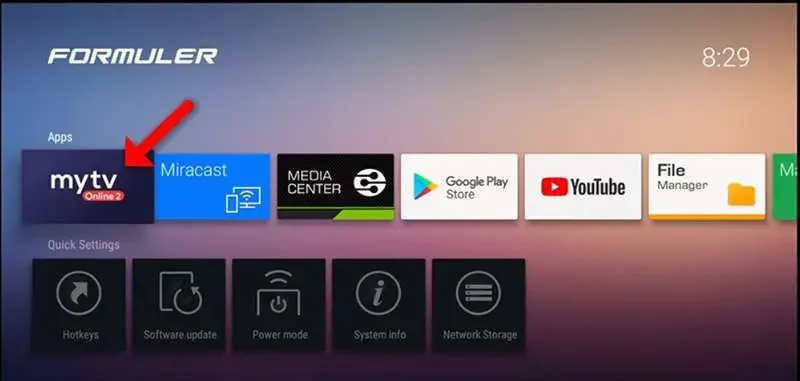
- From the Formuler home screen, open the MyTVOnline app (it may be version 2 or 3).
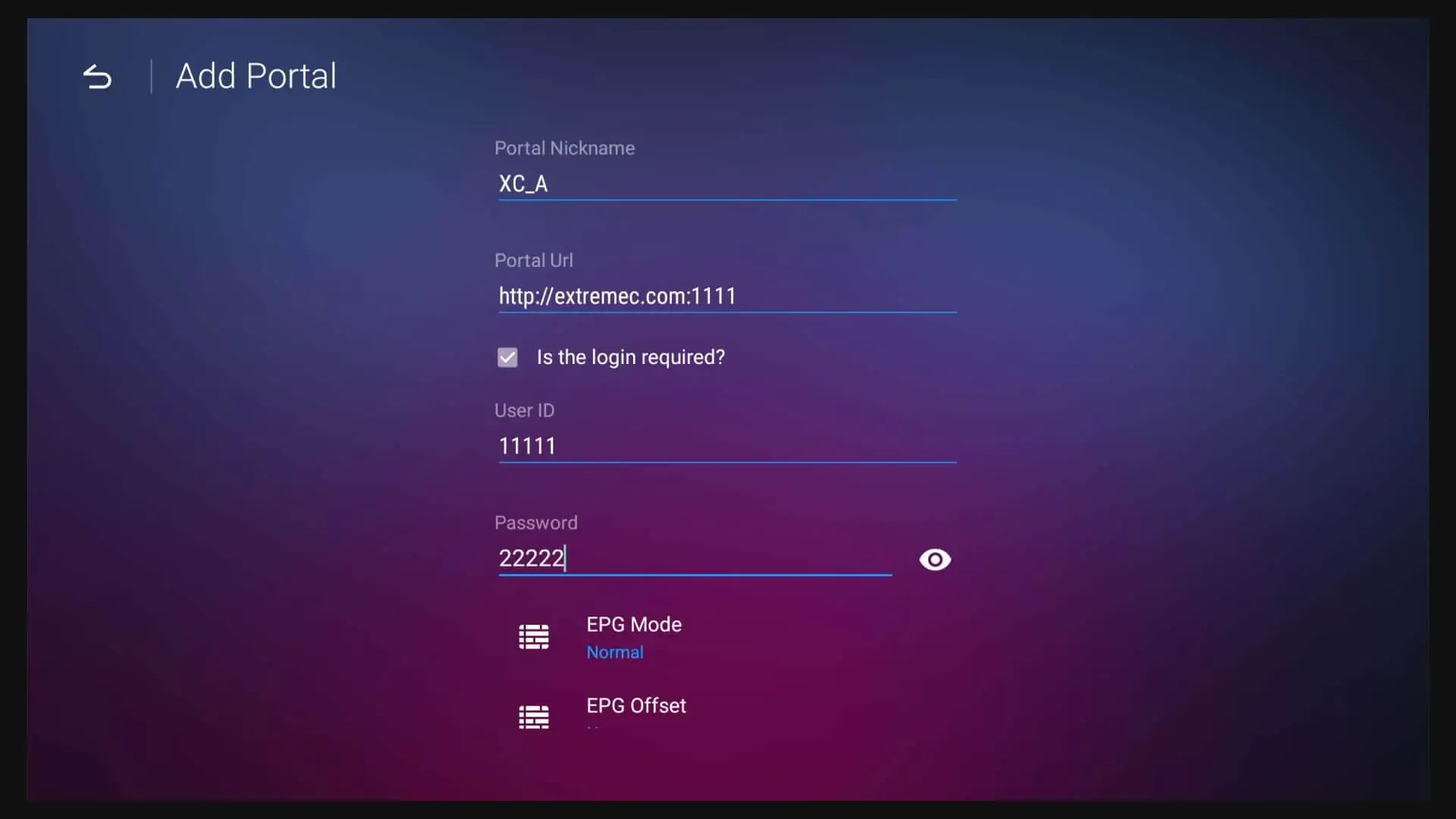
- Select "Add Portal".
- A form will appear. Enter the details from your Rove IPTV email:
- Portal Nickname: Enter a friendly name, like `Rove IPTV`.
- Portal URL: Type the URL *exactly* as it appears in your email.
- Username: Enter your provided username.
- Password: Enter your provided password.
- Check the box to log in, then click "Connect".
- The app will connect to the server and begin loading the channels and Electronic Program Guide (EPG). Success! You're ready to stream.
Pro-Level Optimization for the Best Quality
To ensure a flawless experience, tweak these settings within the MyTVOnline app:
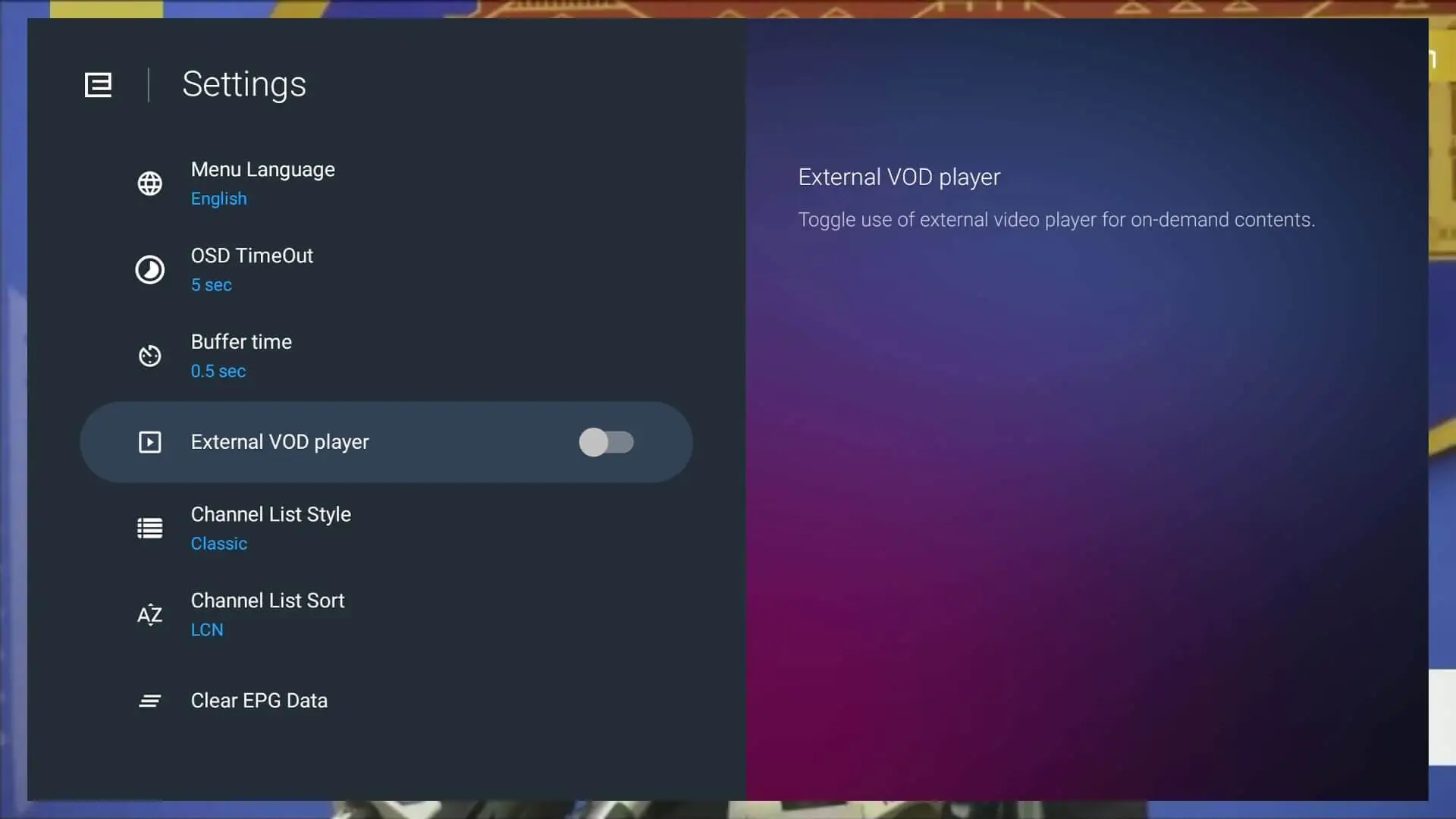
- Network Connection: We can't stress this enough: use a wired Ethernet connection. While Wi-Fi is convenient, a physical cable provides a faster, more stable connection that is far less prone to interference. A good explanation of Ethernet vs. Wi-Fi can be found on HighSpeedInternet.com.
- Buffer Size: In the MyTVOnline settings, you can slightly increase the buffer time (e.g., to 5 seconds). This pre-loads more of the stream, helping to smooth over minor network hiccups, but don't set it too high.
- Video Decoder: The "Auto" setting works well for most, but if you experience issues with specific channels, you can try switching between Software and Hardware decoding to see which performs better.
- External Storage for DVR/Timeshift: To pause live TV or record shows, you need to connect a USB drive. For best results, use a high-speed USB 3.0 flash drive and format it directly through the Formuler's settings menu before use.
Why Choose Rove IPTV for Your Formuler Box?
While Formuler boxes work with many providers, pairing them with a premium service like Rove IPTV unlocks their full potential. Here’s why our service is the top choice for Formuler users in Canada:
- Unmatched Stability: Rove uses managed streaming infrastructure, while playback quality still depends on the source, device, and network conditions. Don't just take our word for it—see what our customers say in these Rove IPTV Reviews.
- Optimized for MyTVOnline: Our service is perfectly configured to work with all features of the MyTVOnline app, including the EPG, catch-up, and VOD library.
- Expert Support: Our support team is familiar with Formuler devices and can provide quick, effective help if you ever run into issues.
Common Issues & Troubleshooting Fixes
Problem: "Authentication Failed" error.
Solution: 99% of the time, this is a typo. Carefully re-enter your Portal URL, username, and password. They are case-sensitive. Check for common mistakes like confusing the number `0` with the letter `O`.Problem: Constant buffering or freezing.
Solution: Use a wired Ethernet connection. Restart your router and Formuler box. If the issue persists, your ISP might be throttling your connection. Using a reliable VPN is the best solution for ISP throttling.Problem: Channels or EPG not loading.
Solution: First, ensure your Rove IPTV subscription is active. If it is, go to the MyTVOnline settings and choose "Refresh" or "Reload Portal". If the problem persists, don't hesitate to contact Rove IPTV support—they are there to help active subscribers.Problem: Black screen but sound is working.
Solution: This is often a video decoder issue. Go to MyTVOnline settings, find the "Video Decoder" option, and switch it from "Auto" to "Hardware" or "Software" to see if it resolves the issue for that channel.Enjoying this guide?
See live pricing for every device tier.
Burning Questions? We've Got Answers!
Quick solutions for your Formuler IPTV inquiries.
Ready for the Ultimate Streaming Experience?
Unlock thousands of channels, movies, and sports in stunning HD and 4K. Get your IPTV Canada Subscription now and transform your Formuler Box into the ultimate entertainment hub.
Get Your Rove IPTV Plan Now
Ready to switch to Rove IPTV?
Compare plans and get started in minutes.